I had a problem where i wanted a dynamic b2Body to not be affected when another moving dynamic body would hit it no matter how hard. I set multiple joints to reinforce that I did not want that body to move, but it still moved once in a great while. It would take several ticks for it to get back to it's proper position and by that time, the app pretty much crashed.
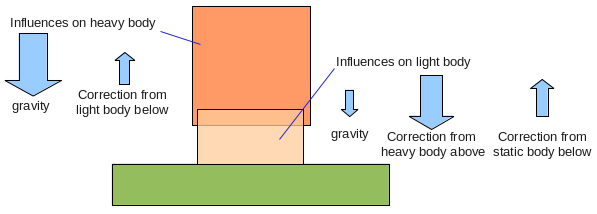
The image on this Box2d Joints Tutorial touches on this problem. The author says that the heavier object is not corrected much by the impulses and so it can take many steps to correct the mis-alignment. Similarly in a real world situation if this were to happen one of the objects would give in. In Box2d objects don't just give in. The author says to make the densities of the two bodies the same. Doing that however, worsened my problem for me. Doing the opposite, the stationary body having 10000 times more density than the moving object, also did not seem to help.
Finally after accepting that I would not be able to resolve this problem I came up with a workaround. I calculate where the stationary body should be and if it is not there, I manually move the b2body there like so:
if (stationaryBodyPoint != calculatedPoint) {
body->SetActive(FALSE);
body->SetTransform(calculatedPoint, 0);
body->SetActive(TRUE);
}
This seems to work for my app. You'll still see that the stationary body does move, but quickly readjusts.
Showing posts with label box2d. Show all posts
Saturday, April 28, 2012
Monday, November 21, 2011
How to Add Box2d to your Xcode project
- Drag the Box2D folder into your project (select "Copy items into destination group's folder (if needed)" to make a copy of the files)
- Change File Type from c.objc to cpp.objcpp (Use command-select your .m source files, then right click->Get Info->General->File Type)
- For Xcode 4 make sure any file that includes box2d or any files that include the files that include box2d have a file type of Objective-C++ source.
- Select Project->Project Settings->Build (Use search)
- Always Search User Paths: YES
- Header Search Paths: "$(SRCROOT)" (put a tick next to recursive)
- Compile for Thumb: NO (this is because thumb is slow when using floating point)
- Other C Flags / Other C++ Flags: -DTARGET_OS_IPHONE
- Change File Type from c.objc to cpp.objcpp (Use command-select your .m source files, then right click->Get Info->General->File Type)
- For Xcode 4 make sure any file that includes box2d or any files that include the files that include box2d have a file type of Objective-C++ source.
- Select Project->Project Settings->Build (Use search)
- Always Search User Paths: YES
- Header Search Paths: "$(SRCROOT)" (put a tick next to recursive)
- Compile for Thumb: NO (this is because thumb is slow when using floating point)
- Other C Flags / Other C++ Flags: -DTARGET_OS_IPHONE
Subscribe to:
Posts (Atom)